Total Station Usage
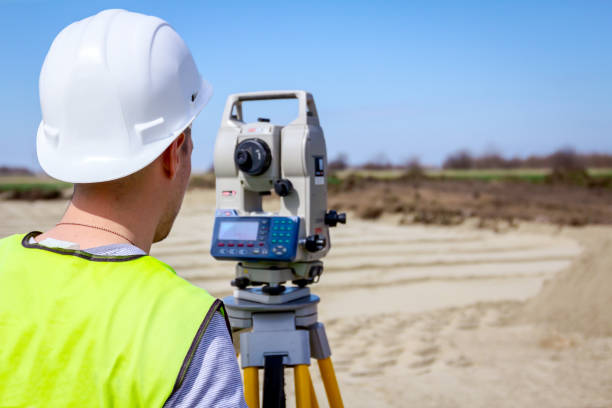
Total stations are versatile surveying instruments that integrate electronic distance measurement (EDM), electronic theodolite, and data processing capabilities in one device. They are widely used in construction, civil engineering, land surveying, and mapping to measure angles, distances, and coordinates with high precision. This guide provides a comprehensive overview of how to set up, use, maintain, and troubleshoot total stations effectively.
1. Understanding the Total Station
A total station combines several components:
- Telescope: Allows for accurate sighting of targets.
- EDM (Electronic Distance Measurement): Measures distances by bouncing a laser or infrared beam off a target.
- Angle Measurement System (Theodolite): Measures horizontal and vertical angles.
- Data Collector: Records measurements, calculates coordinates, and stores data.
- Display and Keypad: Interface for inputting data and viewing results.
2. Setting Up the Total Station
Proper setup is crucial for accurate measurements. Here are the steps:
Site Selection and Preparation:
- Choose a stable location with clear visibility of targets.
- Ensure the setup area is level and free from obstructions.
Tripod Setup:
- Extend the tripod legs and set it up approximately level.
- Position the tripod over the survey point (e.g., marked on the ground) using a plumb bob or optical plummet.
- Push the tripod legs firmly into the ground to stabilize.
Mounting the Total Station:
- Attach the total station to the tripod head and secure it using the mounting screw.
- Use the built-in optical plummet or laser plummet to center the instrument exactly over the survey point.
Leveling the Instrument:
- Use the circular bubble level to roughly level the total station by adjusting the tripod legs.
- Use the three leveling screws on the instrument to finely adjust the instrument so that the circular bubble is centered.
Fine Leveling Using the Electronic Bubble:
- Activate the electronic bubble function on the display.
- Adjust the leveling screws according to the on-screen prompts until the electronic bubble is centered.
Zeroing and Calibration:
- Zero the instrument by sighting a known reference point and setting the horizontal angle to zero.
- Calibrate as necessary according to the manufacturer’s instructions to ensure the accuracy of measurements.
3. Basic Measurement Operations
Measuring Angles:
Horizontal Angle Measurement:
- Sight a known reference point (backsight) and set the horizontal angle to zero.
- Rotate the telescope to sight the target point (foresight). The displayed angle is the measured horizontal angle between the backsight and foresight.
Vertical Angle Measurement:
- The vertical angle is measured as the angle between the telescope line of sight and the horizontal plane.
- Direct the telescope to the target and read the vertical angle displayed on the screen.
Distance Measurement:
Setting Up the Target Prism:
- Place the target prism directly over the survey point.
- Ensure the prism is properly centered, level, and facing the total station.
Measuring Distance:
- Sight the prism center with the total station’s crosshairs.
- Trigger the EDM function; the total station will emit a laser or infrared beam to measure the distance to the prism.
- The measured distance will display on the screen, along with the vertical angle and slope distance.
Slope and Horizontal Distance:
- The total station automatically calculates the horizontal distance, slope distance, and height difference between the instrument and the prism.
Coordinate Measurement:
Setting Coordinates:
- Input known coordinates of the instrument setup point and backsight into the total station.
- The instrument uses these inputs to calculate the coordinates of new target points during the survey.
Recording Measurements:
- Sight the target, and the instrument will automatically record the coordinates based on the distance and angles measured.
- Save the data on the total station’s internal memory or data collector.
4. Advanced Total Station Functions
Stakeout:
- Purpose: Used for setting out points, lines, or other design features on the ground based on the survey plan.
Process:
- Input the coordinates of the stakeout point into the total station.
- The total station guides the user by showing the direction and distance to move the prism until the point is reached.
- Mark the location on the ground once the prism is positioned correctly.
Remote Elevation Measurement (REM):
- Purpose: Measures the height of inaccessible points (e.g., top of a building).
Process:
- Measure the horizontal distance and vertical angle to a point on the vertical line directly below the target (base of the building).
- Aim at the target (top of the building) and measure the vertical angle.
- The total station calculates the height difference between the base and the target.
Traverse Surveying:
- Purpose: Used to establish control points by measuring angles and distances between a series of points.
Process:
- Set up the instrument at a known point and measure to the next point.
- Move the instrument to the new point and continue the process.
- Compute coordinates for all control points using the collected data.
5. Data Handling and Transfer
Storing Data:
- Save all measurements on the total station’s internal memory or connected data collector.
- Use clear naming conventions for each job to avoid data mix-ups.
Data Transfer:
- Use USB cables, Bluetooth, or SD cards to transfer data from the total station to a computer.
- Ensure compatibility of software used for data processing and visualization.
Data Processing:
- Use specialized software (e.g., AutoCAD, Civil 3D, or proprietary survey software) for processing, analyzing, and plotting survey data.
- Check for errors or inconsistencies during the processing phase.
6. Maintenance Tips for Total Station
Regular Cleaning:
- Clean the total station with a soft, dry cloth. Avoid touching the lenses; use a lens brush or blower to remove dust.
- Keep the instrument dry and avoid exposure to extreme temperatures and humidity.
Battery Management:
- Charge batteries fully before use and avoid running them to complete depletion.
- Keep spare batteries handy and replace old or damaged batteries.
Calibration Checks:
Regularly check and calibrate the instrument, particularly the EDM and angle measurement components, to maintain accuracy.
- Follow manufacturer guidelines for calibration procedures.
Firmware Updates:
- Update the firmware of the total station regularly to benefit from the latest features, bug fixes, and performance improvements.
Proper Storage:
Store the total station in a protective carrying case when not in use.
- Keep it in a dry, dust-free environment away from direct sunlight and extreme temperatures.
7. Troubleshooting Common Issues
Measurement Errors:
- Ensure the instrument is properly leveled and centered over the point.
- Check for prism misalignment or damage.
Communication Problems:
- Verify that data cables are securely connected and compatible with the instrument.
- Ensure that Bluetooth or other wireless connections are functioning correctly.
Display or Function Errors:
- Restart the total station to resolve minor glitches.
- Reset the instrument to factory settings if persistent issues occur.
8. Safety Precautions
Avoid Direct Sunlight:
- Do not point the telescope directly at the sun to avoid damaging internal optics.
Laser Safety:
- Be aware of laser safety guidelines, especially when working around people. Avoid direct eye exposure to the laser beam.
Secure Equipment:
- Always secure the tripod and total station to prevent toppling.
- Keep equipment safe from unauthorized access or environmental hazards.
Conclusion
Using a total station effectively requires careful setup, accurate measurements, proper data handling, and regular maintenance. Understanding each function and following best practices ensures high precision and reliability in surveying tasks. By adhering to the guidelines outlined in this guide, you can maximize the efficiency and lifespan of your total station, making it an invaluable tool in your surveying and engineering projects.
Maintenance tips for Total station
Maintaining a total station is essential to ensure its accuracy, longevity, and overall performance. Regular upkeep helps avoid costly repairs and minimizes downtime during surveying tasks. Below are detailed maintenance tips for keeping your total station in optimal working condition:
1. Regular Cleaning and Inspection
- Clean the Instrument: Use a soft, dry cloth to clean the total station’s exterior. Avoid using harsh chemicals or abrasive materials that could damage the device. For lenses, use a lens brush or blower to remove dust, and a lens cloth for gentle cleaning.
- Inspect the Optical Components: Regularly inspect the telescope lenses and EDM components for dust, smudges, or scratches. Clean with care using appropriate lens cleaning tools to prevent damage.
- Check the Leveling Screws and Tripod: Inspect leveling screws for smooth operation and ensure they are not worn out or loose. Check the tripod for stability and tighten any loose screws or bolts.
- Protect Connectors and Ports: Ensure that connectors, ports, and cables are free from dust, moisture, and corrosion. Use protective caps when not in use and regularly inspect for any signs of wear.
2. Battery Care and Power Management
- Monitor Battery Health: Check battery health regularly. Replace batteries showing signs of swelling, leakage, or reduced capacity. Always use the manufacturer-recommended batteries.
- Proper Charging Practices: Charge batteries fully before use and avoid leaving them on charge indefinitely. Store batteries in a cool, dry place when not in use, and keep spare batteries available.
- Avoid Complete Discharge: Avoid letting batteries discharge completely, as this can reduce their lifespan. Recharge promptly after use.
3. Calibration and Adjustment
- Regular Calibration: Periodically calibrate the total station’s angle measurement, EDM, and compensator according to the manufacturer’s guidelines. Calibration ensures the instrument maintains its accuracy over time.
- Check Collimation and Compensator: Regularly check the collimation (alignment of the optical line of sight) and compensator (automatic level adjustment). Perform these checks frequently, especially if the instrument is subject to bumps or rough handling.
- Angle Calibration: Use a known reference or calibration station to verify the accuracy of horizontal and vertical angle measurements. Adjust the instrument settings as necessary.
4. Firmware and Software Updates
- Update Firmware: Manufacturers periodically release firmware updates that improve the total station’s performance, fix bugs, and add new features. Check for updates regularly and apply them as needed.
- Use Compatible Software: Ensure that the data transfer and processing software you use is up-to-date and compatible with the total station. Incompatible software can cause data transfer issues and processing errors.
5. Environmental Protection
- Avoid Extreme Temperatures and Humidity: Keep the total station away from extreme temperatures, high humidity, and direct sunlight, which can damage sensitive components. Use protective covers in harsh weather conditions.
- Protect from Dust and Moisture: Use dust covers when the instrument is not in use, especially in dusty or sandy environments. In wet conditions, use weatherproof covers to protect the instrument from rain and moisture.
- Shock and Vibration Protection: Avoid dropping or subjecting the total station to shocks and vibrations. Use padded cases for transport and always secure the instrument firmly on the tripod during use.
6. Proper Storage
- Store in a Protective Case: Always store the total station in its protective carrying case when not in use. The case should have padding to shield the instrument from shocks and environmental factors.
- Avoid Long-Term Storage in Extreme Conditions: Do not store the total station in environments with extreme heat, cold, or high humidity for prolonged periods, as these conditions can degrade electronic components.
- Desiccant Use: Place silica gel or other desiccants inside the storage case to absorb moisture and protect against corrosion.
7. Cable and Accessory Maintenance
- Inspect Cables and Connectors: Regularly check cables for cuts, frays, or signs of wear that could lead to poor connections or data loss. Replace damaged cables immediately.
- Secure Cables Properly: When setting up, ensure cables are neatly arranged and not stretched or stressed, which can cause damage over time.
- Protect Data Collectors: Keep data collectors and other accessories clean and protected. Use protective covers and avoid dropping or mishandling them.
8. Regular Function Checks
- Check Measurement Accuracy: Periodically verify the accuracy of distance and angle measurements by comparing them with known values. This practice helps identify calibration needs early.
- Test Electronic Functions: Test the electronic display, keypad, and data transfer functions regularly to ensure they are working correctly. Address any malfunctions promptly.
- Run Diagnostic Tools: Use built-in diagnostic tools or software to perform health checks on the total station’s components, such as sensors, compensators, and EDM.
9. Troubleshooting Common Issues
- Erratic Readings: Check for loose connections, misaligned components, or environmental factors such as high heat or cold that could affect performance. Perform a factory reset if necessary.
- Signal Loss or Weak Return: Inspect the prism alignment, check for obstacles, and ensure that the prism is clean and correctly positioned.
- Software Errors: Restart the total station and check for software updates. Reset to factory settings if errors persist.
10. Professional Servicing
- Annual Professional Servicing: Consider sending the total station for professional servicing once a year or as recommended by the manufacturer. Professional calibration and inspection help maintain the instrument’s precision.
- Warranty and Manufacturer Support: Utilize the warranty and support services provided by the manufacturer for troubleshooting, repairs, and maintenance guidance.
Conclusion
Proper maintenance of your total station is vital for its optimal performance and extended lifespan. By following these tips—regular cleaning, calibration, environmental protection, and careful handling—you can ensure reliable and accurate measurements on all your surveying tasks. Regular maintenance not only protects your investment but also enhances the efficiency and productivity of your field operations.